
Free dictation for Windows that works offline
Hold Ctrl+Shift+D, say it, release — the text appears wherever your cursor is: Word, Google Docs, Slack, email. Speech recognition runs on your computer, so nothing is uploaded. Dictation is part of the Konspekt app, and it’s free.
Download for WindowsWindows 10 and 11 · free · no sign-up · v0.18.1
0/75 antivirus engines on VirusTotal flagged the fileHow it works
- Install Konspekt and let the speech models download on first launch.
- Put your cursor where the text should go.
- Hold Ctrl+Shift+D and speak. A small “listening” bar shows while you talk.
- Release the keys: the text is inserted in one go, with commas, periods and capital letters.
Works in any Windows app
Anywhere you can type: Word and Google Docs, your browser, Slack, Telegram and WhatsApp for desktop, email, notes. One dictation can be up to five minutes long.
One exception: Windows does not let input into windows running as administrator. There the text stays in the clipboard — paste it with Ctrl+V.
Offline and private
Konspekt recognizes speech on your own computer. Dictate emails, contracts and notes with personal details without wondering where your voice goes: it never leaves the PC.
It also works on a train, at a cabin or in an office with locked-down internet. The internet is needed only once, to download the speech models.
English, Spanish and Russian — detected automatically
You don’t switch languages by hand: the language of each phrase is detected by itself. English, Spanish and Russian work well. German and Serbian work when they’re one of your Windows languages or set as your main meeting language. Other languages work too, with varying accuracy.
Settings
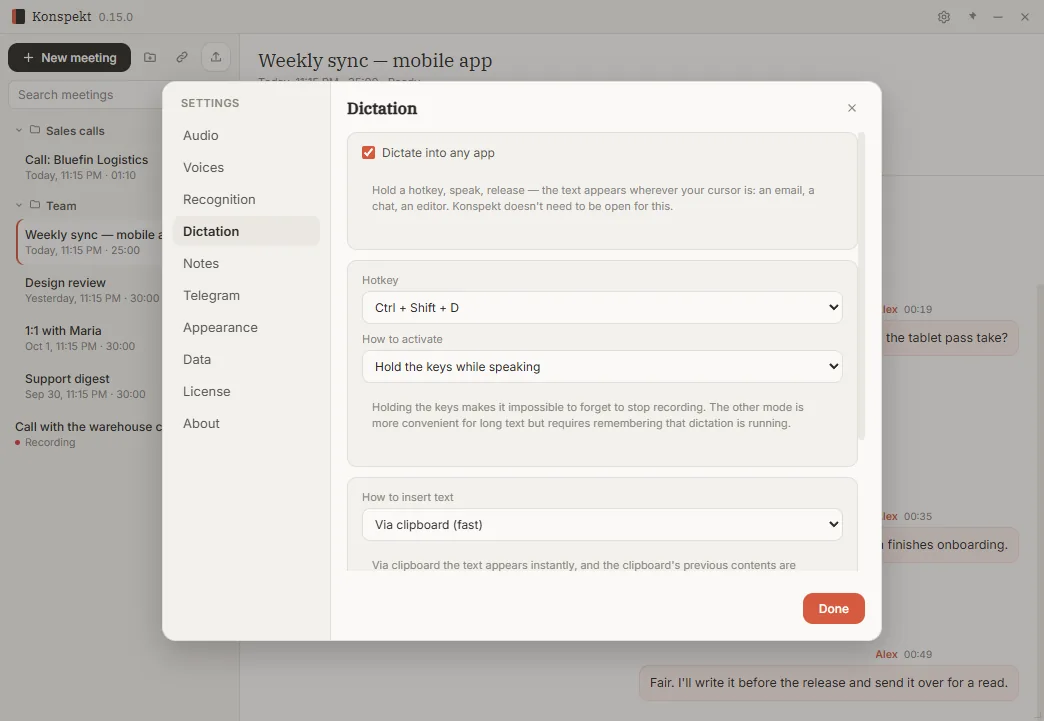
- Hotkey: Ctrl+Shift+D, Ctrl+Shift+Space, Ctrl+Alt+D or Alt+Q.
- Mode: hold the keys while you speak, or press once to start and once more to stop.
- Text goes in through the clipboard (whatever was there before comes back) or is typed letter by letter.
- Use dictation only, without recording meetings: Settings → Dictation. No need to open the Konspekt window — it runs from the system tray.
Requirements
Windows 10 or 11, 64-bit. The speech models download once, about 720 MB; Serbian adds about 290 MB — automatically, in the background. No graphics card needed.
Konspekt also records your meetings
The same app records calls in Zoom, Teams, Google Meet or any other app, transcribes them and writes the notes. That part is paid, with 10 meetings to try. Dictation stays free either way.
More about Konspekt →Questions
Is dictation really free?
Yes. It needs no license and no sign-up, and it doesn’t use up Konspekt’s trial meetings.
Do I need the internet?
Only once, to download the speech models. After that, dictation works without a connection.
Does it add punctuation?
Yes, commas, periods and capital letters are added automatically. Voice commands like “new line” aren’t supported yet.
Does it work in Microsoft Word?
Yes, and in any other Windows app where you can type.
Which languages does it understand?
English, Spanish and Russian — the language of each phrase is detected automatically. German and Serbian work when they’re one of your Windows languages or set as your main meeting language. Other languages work too, with varying accuracy.
Is there a version for Mac or phones?
No, only Windows 10 and 11.
Why does the text appear after I release the keys, not while I speak?
Konspekt recognizes the whole phrase at once and places the punctuation. It doesn’t type letter by letter as you talk.